
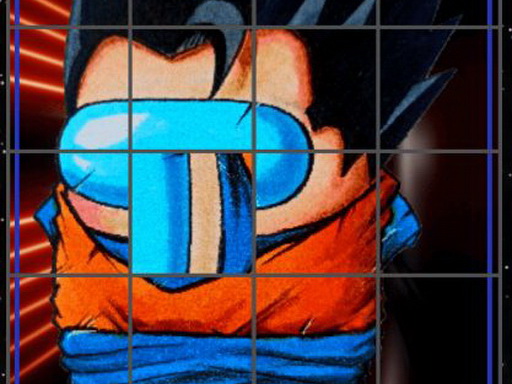
Rotate Puzzle Challenge
Reviews
Rotate Puzzle Challenge keeps its scope narrow and executes it well. The click-to-rotate mechanic is instantly understandable, and sequential level unlocking gives structure without pressure. The timer adds just enough urgency to encourage focus, while the family-friendly design and lack of downloads make it easy to recommend for casual players, children, or anyone wanting a low-stakes mental warm-up. The main limitation is variety: if you dislike image-reassembly puzzles, the core loop will not change your mind.
About this game
How the Rotation Mechanic Works
Each puzzle presents a scrambled image divided into small square tiles. Clicking any tile rotates it, and your task is to keep clicking until every tile is oriented correctly to form the complete picture. The challenge comes from tracking which tiles still need adjustment and recognizing when a tile is correctly aligned. Because each click changes only one tile's orientation, you can work through the puzzle at your own pace without worrying about accidentally disturbing already-solved sections.
Level Progression and Difficulty Curve
Levels unlock sequentially, so you must complete one puzzle before moving on to the next. The game starts with simpler images and gradually introduces more complex ones, giving you time to build pattern recognition and speed. A timer runs during each level, adding a light sense of urgency without turning the experience into something stressful. The combination of sequential unlocking and a timer means you are always working toward a clear, achievable goal.
Who This Puzzle Suits
Rotate Puzzle Challenge is designed for players of all ages, including children and adults. The click-to-rotate controls are intuitive enough for beginners, while the timer and increasing image complexity give experienced puzzle fans something to improve at. It works well for short breaks or longer sessions because there is no penalty for pausing between levels. The game is completely free to play online and requires no downloads or installations.
Practical Tips for Solving Faster
Start by focusing on the edges of the image, since border tiles often provide clearer visual anchors than interior pieces. Work systematically from one corner toward the opposite corner rather than jumping between unrelated tiles. If you get stuck, step away briefly and return with fresh eyes. Regular practice improves both rotation speed and your ability to recognize which orientation a tile needs at a glance.
Compatibility
FAQ
Comments
Sign in to leave a review
No comments yet.






Editorial Notes