
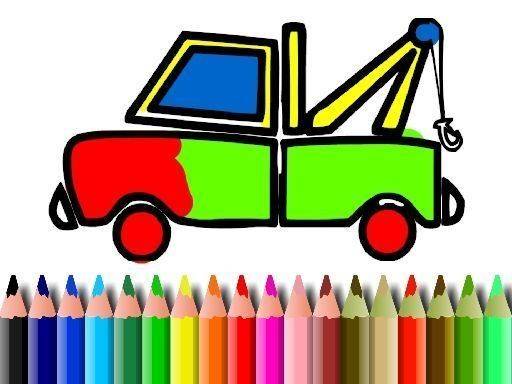
Vehicle Color Studio for Young Artists
Reviews
Vehicle Color Studio for Young Artists delivers exactly what its name suggests: a straightforward coloring tool for children. The absence of timers, scores, and wrong answers makes it accessible for early learners. The undo and redo buttons reduce frustration, while saving finished artwork gives a sense of completion. Parents looking for a calm, creative activity will find it suitable. The main limitation is the lack of specified vehicle variety and advanced drawing tools, but for its intended audience, the simplicity is a strength.
About this game
Coloring Made Simple
Vehicle Color Studio for Young Artists opens with a clean vehicle outline and a color palette on the side. Players tap or click any area to fill it with the selected color. The interface avoids complex menus, so even young children with developing fine motor control can start coloring immediately.
A Palette for Every Idea
The palette spans bright primary colors to softer pastels. Because there are no wrong choices, children can apply different shades to different parts of the vehicle—a red body with blue wheels, or a rainbow pattern across the hood. This open-ended setup supports both simple and detailed designs while building confidence.
Undo, Redo, and No Pressure
Two on-screen buttons—undo and redo—let players step back from accidental fills and try again. The game includes no timers or scoring systems, so children can work at their own pace. This makes it suitable for relaxed after-school play or quiet weekend mornings.
Saving and Sharing Artwork
Once a vehicle design is complete, the game allows saving the artwork to the device. Families can keep a collection of finished pieces or share them with relatives. This simple option adds a sense of accomplishment and opens conversations about color choices and design decisions.
Skills Built Through Play
Coloring activities like this one help children practice hand-eye coordination and color recognition. Selecting colors and filling precise areas develops fine motor skills naturally. The open-ended nature also encourages independent decision-making as children plan their approach and see their ideas on screen.
Compatibility
FAQ
Comments
Sign in to leave a review
No comments yet.






Editorial Notes